Advanced Ren'Py - Parametric Equations for Programmatic Animation
What is this?
First off, I'd like to explain where this is coming from. Having spent more time recently in the renpy discord server, I've been motivated to start sharing some of the more useful information I've picked up over my years of pushing around the renpy engine and doing things that would make Tom cry (sorry Tom). That is not in small part thanks to the kind encouragement of those in the server.
Probably one of the most ubiquitous "advanced" techniques I use in nearly every complex ATL animation I do is the use of parametric equations. You also use them all the time, though you might not know it, or at least not know them by name.
Before beginning, you should be familiar with:
- Ren'Py's ATL language
- How Transforms work
- The
sttimebase - Generally what warpers such as
linearandeasedo, though not how they do it - Function currying
🤔 What is a Keyframe? A bit of history
In Ren'Py, and digital animation in general, usually you want to take an object and change it in some way over time. If you're familiar with keyframes in any kind of animation software, then this should sound familiar. If you're not that's ok too.
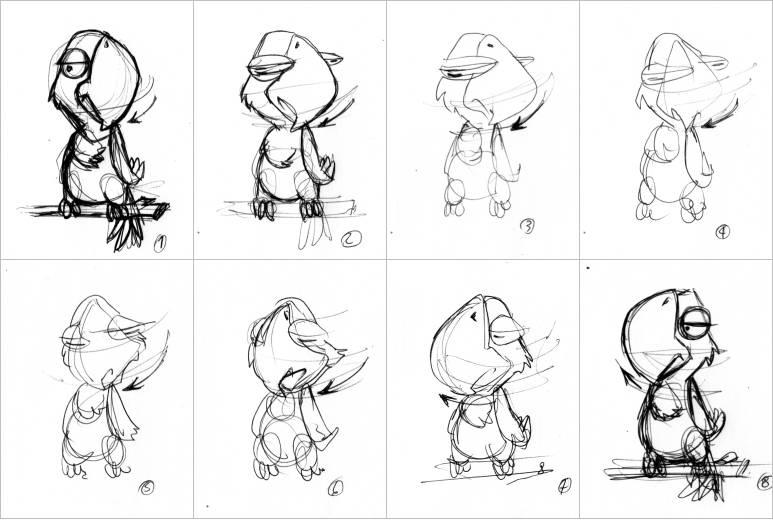
Animation Sketch by ImRoGeR CC BY-NC-ND 3.0
In traditional animation, a lead artist would draw many "landmarks" of an animation called keyframes. These would be way less than are needed for an animation to look smooth, but they lay out in large part how a drawing should change over time to achieve the desired artistic impression. Next, more junior artists would fill in the gaps drawing the remaining frames. With the keyframes and the remaining frames, called "in-betweens" or just "tweens", you have enough frames to create a smooth animation at your target framerate.
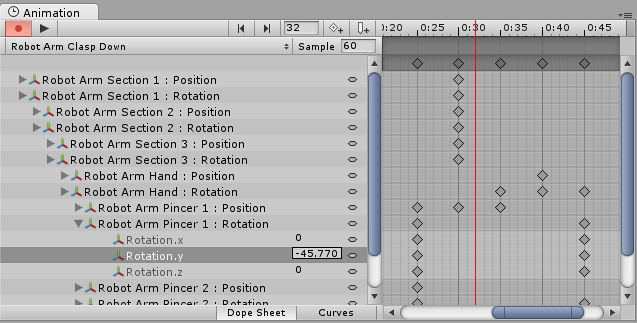
The Dopesheet view in Unity3d, from the unity manual
With digital keyframe animation, an artist specifies properties of a manipulable art asset such as position, scale, rotation as specific keyframes at specific times, and the software can be your junior animator, automatically creating the inbetweens. In the animation world this is called "tweening," and the tool used to lay out the what and when of keyframes is called a "dopesheet."
How is this done though? Through one of the most basic parametric equations. Let's first learn what a parametric equation is.
📈 Parametric Equations
A parametric equation is defined in the Encyclopedia Britannica as such:
a type of equation that employs an independent variable called a parameter (often denoted by t) and in which dependent variables are defined as continuous functions of the parameter and are not dependent on another existing variable.1
What does this mean? Let's say we want to move an object along a line. If you hear "line" and "equation," you'll probably think immediately of the old high-school slope-intercept form of a line:
$$ y = mx + b $$
Here, the variables $x$ and $y$ are what you'd use to move something along the line. Think back to our dopesheet. You know that at some time $t_0$ that your image will be at some starting point $(x_0, y_0)$, and later at $t_1$ it'll be at another point $(x_1, y_1)$. To make this happen smoothly in renpy, you would do the following:
transform move_line:
    xpos x0
    ypos y0
    linear 2 xpos x1 ypos y1
So here, we have our keyframes. And linear does some magic under the hood in order to slide between these two states, moving $x_0$ -> $x_1$ and $y_0$ -> $y_1$. How would we do that in a python equivalent transform? In the renpy, we have the time parameter as 2 from the linear statement.
M = 1
B = 5
def move_line(tf, st, at):
    pass # what the heck
The answer is to use a parametric equation. What we're interested here is the value of $x$ and $y$ as it depends on the show time st which we can simply call t. In slope-intercept form, $x$ is an independent variable, which you can pick any value for. You can think of independent variables like knobs you can adjust. However, while you can pick an $x$ and get a $y$, since $y$ is defined in terms of $x$, it is dependent. But the value that we want to be the "knob" is time, not $x$. We want to know the value of $x$ and $y$ for any given time $t$, and so, we need to rewrite it so that $x$ and $y$ are both dependent on $t$:
$$x = t$$ $$y = mt + b$$
This seems like a trivial change, but it's crucial for developing more complex parametric forms, and it's also directlty what you need to do in your code:
M = 1
B = 5
def move_line(tf, st, at):
    tf.xpos = st
    tf.ypos = M * st + B
    return 0.0334
LERP
Ok, that's great. But there's two issues. First, this doesn't start at $(x_0, y_0)$ and it doesn't end at $(x_1, y_1)$ and it might not take 2 seconds to do so. We need to have a beginning and end of the animation defined somehow. And for our cases, we'll use percentages. At the beginning (0%) of the animation, we're at $(x_0, y_0)$, and when we're at the end of the animation (100% done) we're at $(x_1, y_1)$. You might be tempted to define this interval from 0.0 to 100.0, however in computing in general percentages are almost always defined in the range 0.0 - 1.0. The reason is really simple - it makes using it in math easier. Let's show:
- 50% of 10 is $10 * 0.5 = 5$
- 100% of 10 is $10 * 1.0 = 10$
- 25% of 10 is $10 * 0.25 = 2.5$
Armed with this, we can write a function that changes a value from one thing to another:
def lerp(from, to, t):
    return from + t * (to - from)
This is called Linear Interpolation or LERP for short. And it's used so universally that you'll see it everywhere. Even...
def get_placement(self):
if self.st > self.delay:
done = 1.0
else:
done = self.st / self.delay
if self.time_warp is not None:
done = self.time_warp(done)
absolute = renpy.display.core.absolute
def I(a, b):
return absolute(a + done * (b - a))
old_xpos, old_ypos, old_xanchor, old_yanchor, old_xoffset, old_yoffset, old_subpixel = self.child_placement(
self.old
)
new_xpos, new_ypos, new_xanchor, new_yanchor, new_xoffset, new_yoffset, new_subpixel = self.child_placement(
self.new
)
xpos = I(old_xpos, new_xpos)
ypos = I(old_ypos, new_ypos)
xanchor = I(old_xanchor, new_xanchor)
yanchor = I(old_yanchor, new_yanchor)
xoffset = I(old_xoffset, new_xoffset)
yoffset = I(old_yoffset, new_yoffset)
subpixel = old_subpixel or new_subpixel
return xpos, ypos, xanchor, yanchor, xoffset, yoffset, subpixelHere, Renpy is using the absolute function, which forces a fraction to be treated as an absolute position instead of a relative position
Here, done is our $t$, a is our original value, and b is our ending value. Given the LERP function, satisfy yourself that it produces the expected behavior regardless if a is greater than, equal to, or less than b. With that in our toolbelt, let's go back to our move_line function and add what we've learned:
init python:
    def lerp(from, to, t):
        return from + t * (to - from)

    M = 1
    B = 0.005 # since our xpos is relative, our B should be relative
    def move_line(tf, st, at, /, x0, x1):
        tf.xpos = lerp(x0, x1, st)
        tf.ypos = M * tf.xpos + B
        return 0.0334

    movey = renpy.curry(move_line)

label test:
    show eileen:
        anchor (0.5, 0.5)
        function movey(x0=0.0, x1=1.0)
Cool! If you try this, we will now have eileen move diagonally across the screen. Pretty quickly actually... The reason for this is that st doesn't quite fit our definition of $t$. Remember, $t$ is a percentage whereas st is just seconds. So instead, we'll need to decide how long it should take for our character to move from point to point. Let's say 5 seconds.
init python:
    M = 1
    B = 0.005 # since our xpos is relative, our B should be relative
    def move_line(tf, st, at, /, x0, x1, timey):
        t = st / timey
        tf.xpos = lerp(x0, x1, t)
        tf.ypos = M * tf.xpos + B
        return 0.0334
Oh yeah it's all coming together. By taking a target time and dividing it, we can give ourselves $t$ as a fraction of the currently elapsed time relative to the total runtime of our animation.
$$ t = \frac{elapsed\ time}{total\ time} $$
🗜️ Clamp
Of course, there's one more little rub. Once $elapsed\ time$ exceeds $total\ time$ it'll just keep going. With what we described so far, we probably wanted ourselves to stop at x1, not just keep on going along. That is, as it's written, move_line is a parametric equation of an infinite line2 that starts at $x_0$ and passes through $x_1$ but just keeps going. How do we fix this? Enter another classic graphics function: clamp
def clamp(from, t, to):
    return max(from, min(t, to))
This is a cute little function which prevents t from dipping below from or exceeding to. We'll use it as such:
$$ 0.0 \leq t \leq 1.0 $$
We now have:
init python:
    M = 1
    B = 0.005 # since our xpos is relative, our B should be relative
    def move_line(tf, st, at, /, x0, x1, timey):
        t = clamp(0.0, st / timey, 1.0)
        tf.xpos = lerp(x0, x1, t)
        tf.ypos = M * tf.xpos + B
        return 0.0334
It's noteworthy that the left side of the clamp here is somewhat pedantic since st / timey will never go below 0.0. However, we include it here to create the structure for ensuring a clean t in more complex formulae.
init python:
    def lerp(from, to, t):
        return from + t * (to - from)

    def clamp(from, t, to):
        return max(from, min(t, to))

    M = 1
    B = 0.005 # since our xpos is relative, our B should be relative
    def move_line(tf, st, at, /, x0, x1, timey):
        t = clamp(0.0, st / timey, 1.0)
        tf.xpos = lerp(x0, x1, t)
        tf.ypos = M * tf.xpos + B
        return 0.0334

    movey = renpy.curry(move_line)

label test:
    show eileen:
        anchor (0.5, 0.5)
        function movey(x0=0.25, x1=0.75, timey=5) # the animation will take 5 seconds
Parametric Circles
Okay great. So we just spent a ton of time making a less powerful version of linear. Who cares? Well now that we understand how to use a parametric equation, let's look at some more fun ones. Almost any 2d shape (especially smooth ones) have an equivalent parametric version. For example, how about a circle? Let's do some trig and build it ourselves for fun in order to help you start thinking in parametrics. Let's think about a circle of radius 1 centered around the origin. If we were to start at the rightmost point of the circle, and put a pen down, drawing counterclockwise, our first point would be at $(1, 0)$, and we'd draw up passing through $(0.5, 0.5)$ until we hit $(0, 1)$ at which point we've completed $90^\circ$. Does that sound familiar? Eh..? No...? Ok fine we're gonna use sin and cos.
$$x = cos(2\pi t)$$ $$y = sin(2\pi t)$$ $$where\ 0.0 \leq t \leq 1.0$$
Recall in radians, $2\pi$ is equal to $360^\circ$. So, what our $t$ is doing is sliding from 0.0 to $2\pi$. Let's see visually what that's doing.
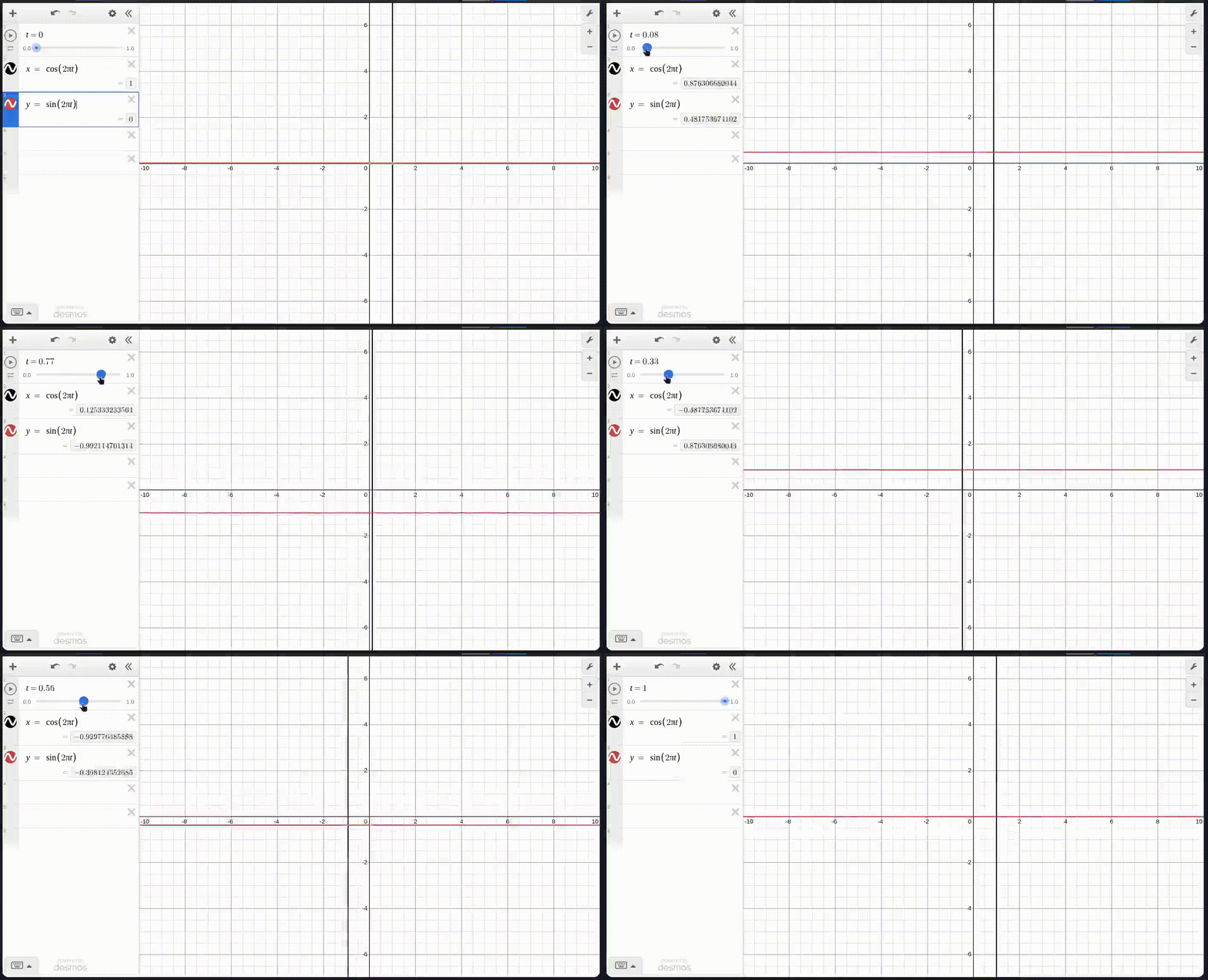
You may wonder why rotate in renpy rotates counterclockwise. This is why. In trigonometry circles run counterclockwise. This circle has radius 1, which if you recall from school makes it a unit circle. What if we want to make it bigger? We simply add the size of the radius to scale the result:
$$x = rcos(2\pi t)$$ $$y = rsin(2\pi t)$$
And we have now arrived at the full parametric definition of a circle. Do you want to offset it? Set the center to $(5, -2)$? Sure we can do that.
$$x = rcos(2\pi t) + 5$$ $$y = rsin(2\pi t) - 2$$
Let's update our renpy from earlier to do this business
    import math
    def move_circle(trans, st, at, /, r, timey):
        t = clamp(0.0, st / timey, 1.0)
        trans.xpos = absolute(r * math.cos(2 * math.pi * t) + (config.screen_width / 2))
        trans.ypos = absolute(r * math.sin(2 * math.pi * t) + (config.screen_height / 2))
        return 0.0334

    movey = renpy.curry(move_circle)

label test:
    show eileen:
        anchor (0.5, 0.5)
        function movey(r=200, timey=5)
Here, we center our circle at the middle of the screen (by taking the screen shape and dividing it by 2). We also are now talking about absolute pixels. The reason for this is that if we were to continue using relative notation, we would actually move in an ellipse, because 0.5 of the screen width is longer than 0.5 of the screen height, so instead we set our radius at the bottom to 200 pixels.
⌚ A Quick Detour into Modular Arithmetic
What if we want to not clamp and stop when the time reaches our time target (which I'll call $t'$). What if instead, we want to send eileen on an infinite journey on Mr Bones' Wild Ride and make her move in a circle, with each revolution taking $t'$ seconds to complete? Enter modular arithmetic. Again, this is something you might already know how to do. In school, before you learned fractions, you were probably taught about division with remainders. It goes like this. For any number, you can make it by dividing it by some smaller number and adding some left over to it. It looks like this:
$$15 / 6 = 2R3$$ Or, if you take 6, multiply it by 2 and add 3, you get 15. Something interesting happens if you increase the dividend and watch the remainder:
| dividend | $\div$ 6 |
|---|---|
| 15 | R3 |
| 16 | R4 |
| 17 | R5 |
| 18 | R0 |
| 19 | R1 |
| 20 | R2 |
It loops! There is in fact a name for this function of dividing a value by something and only caring about the remainder. It is called the modulo function. Here, the number 6 is our modulus, and we can rewrite:
$$15\ modulo\ 6 = 3$$
Usually it's shortened to
$$15\ mod\ 6 = 3$$
In code, we use the percent symbol:
15 % 6 = 3
This looping behavior is extremely useful to us as it means that we can cause a sequence to repeat forever. It's one of the reasons that modular arithmetic is sometimes called 'clock math.' With that in hand, let's take our new knowledge and send eileen on her loop:
init python:
    import math
    def move_circle(trans, st, at, /, r, timey):
        t = (st % timey) / timey
        trans.xpos = absolute(r * math.cos(2 * math.pi * t) + (config.screen_width / 2))
        trans.ypos = absolute(r * math.sin(2 * math.pi * t) + (config.screen_height / 2))
        return 0.0334

    movey = renpy.curry(move_circle)

label test:
    show eileen:
        anchor (0.5, 0.5)
        function movey(r=200, timey=5)
Here, we take the amount of time that has passed modulo $t'$, in our case 5 seconds. This will cause a looping sequence starting at 0, when st is divisible by 5, and continuing up until 53. Thus, it's kind of like time restarts back at 0 every time. And we remember that $t=st / t'$, so we now have eileen spinning around forever.
Complicating Things
Now that we've got a solid foundation, we can start combining our parametrics to do really interesting stuff. Let's take the above infinite circle code and instead of just spinning around one point, let's ease the center of our circle... in a circle. Have a look:
init python:
    import math
    def move_flower(trans, st, at, /, r, timey):
        t = (st % timey) / timey
        faster_t = (st % (timey / 8)) / (timey / 8)
        w = config.screen_width / 2
        h = config.screen_height / 2
        offt_x = lerp(-100, 100, math.sin(2 * math.pi * (1.0 - faster_t)))
        offt_y = lerp(-100, 100, math.cos(2 * math.pi * (1.0 - faster_t)))
        trans.xpos = absolute(r * math.cos(2 * math.pi * t) + offt_x + w)
        trans.ypos = absolute(r * math.sin(2 * math.pi * t) + offt_y + h)
        return 0.0334

    movey = renpy.curry(move_flower)

label test:
    show eileen:
        anchor (0.5, 0.5)
        function movey(r=400, timey=5)
Running this code produces the effect of a spiraling circular motion. I used a few techniques here. First off, I made faster_t which means that each tiny loop will circuit much faster than the large loop by dividing $t'$ by 8. Next, I wanted to make sure the smaller loops were running counter to the direction of spin of the big loop, because it makes the final effect look much more jerky and dramatic. I achieved this by having faster_t move down instead of up by doing 1.0 - faster_t. The choice of offset in the x and y direction of 100 each way was arbitrary, but with the goal of making the smaller petals noticably smaller than the large circle (which I raised to $r = 400$).
Try doing that with ATL.
📓 Homework and Final Thoughts
With all this, you should be able to see the power of parametric equations, and the underlying basis for many complex behaviors. You are not limited to x and y positions. You can lerp anything that's a number. Color? Rotation? Scale? Alpha? Try setting a tint where the red value is $sin(2\pi t)$ and the blue value is $cos(2\pi t)$.
As a demonstration of adaptability, and a bit of homework, search for "parametric form of an ellipse" and update the infinite circle code snippet to make eileen move in an ellipse.
💜 Thaaaanks :)
If you've come this far, I hope you've learned something about math or renpy or both. Perhaps you've learned that you hate math. That's ok too. We now have the building blocks to make some really really interesting animations. In the next entry in this series, I'll be discussing handrolled splines (aka lerpception) and animation blending.
Ucal, Meltem. "parametric equation". Encyclopedia Britannica, 1 Jun. 2021, https://www.britannica.com/science/parametric-equation. Accessed 24 April 2026.
A ray, technically
kinda. It will approach 5 but the second it hits 5 it'll go back to 0. It's close enough that you won't notice really.